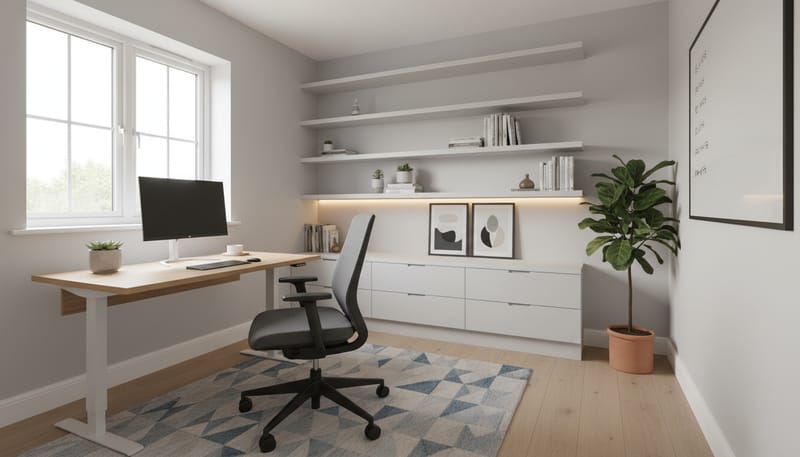
Choosing Your Room
The first decision is where to put your office. New build layouts vary from compact two-bedroom apartments to five-bedroom family homes, and each layout presents different opportunities. The room you select will influence everything else: desk size, lighting options, acoustic privacy, and how effectively you can separate work from home life. Many new build developers now include a dedicated study or home office in their floor plans, reflecting the shift in how British households use their homes.
Before committing to a room, walk through your new build with a tape measure and consider the following factors. For a broader overview of what to assess during your visit, see our guide to what to look for when viewing a new build.
- Natural light direction: North-facing rooms provide consistent, glare-free light ideal for screen work. South-facing rooms are brighter but may require blinds to manage afternoon sun.
- Distance from living areas: A room furthest from the kitchen and living room minimises household noise during working hours.
- Power socket locations: Count the double sockets and note their position relative to where a desk would sit. Desk-height sockets are preferable to skirting-level ones.
- Door type: A room with a solid-core door (rather than hollow-core) provides significantly better sound insulation for calls and concentration.
- Window size and position: Larger windows mean better natural light, but ensure you can position a desk perpendicular to the window to avoid screen glare.
- Room dimensions: A minimum of 2.4m x 2.4m is needed for a comfortable single-person office with a standard desk and chair.
- Ethernet availability: Check whether the room has an RJ45 wall socket connected to the home network, which many new builds now include as standard.
- Ventilation: Trickle vents in window frames and, in newer properties, mechanical ventilation with heat recovery (MVHR) ensure fresh air without draughts.
| Room Option | Typical Size | Pros | Cons | Best For |
|---|---|---|---|---|
| Spare bedroom | 3.0m x 3.5m | Dedicated space, door for privacy, good natural light | Reduces bedroom count for resale | Full-time remote workers |
| Box room / Bedroom 4 | 2.4m x 2.4m | Naturally enclosed, minimal furniture needed | Limited space for dual monitors or meetings | Laptop-based work, single monitor setups |
| Under-stairs alcove | 1.5m x 2.0m (approx.) | Uses otherwise dead space, ground floor access | Limited headroom, no door, poor ventilation | Part-time or hybrid workers |
| Open-plan corner | Variable | No room sacrificed, flexible layout | No acoustic privacy, household distractions | Light admin work, occasional use |
| Garden office pod | 3.0m x 3.0m+ | Complete separation from home, quiet, dedicated space | Significant upfront cost, planning considerations | Self-employed, video-heavy roles |
Desk Selection and Placement
Your desk determines how comfortably and efficiently you work every day. The three main categories are traditional fixed-height desks, sit-stand electric desks, and standing desk converters. Each has distinct advantages depending on your budget, working style, and room dimensions. Placement matters just as much as the desk itself: aim to position it perpendicular to your window so natural light falls from the side, reducing screen glare while keeping your workspace well-lit.
| Desk Type | Example Models | Dimensions (W x D) | Price Range | Key Feature |
|---|---|---|---|---|
| Traditional fixed | IKEA LAGKAPTEN + ALEX, MADE Leona, John Lewis Abacus | 120cm-160cm x 60cm-80cm | £80 – £500 | Stable, affordable, wide range of styles |
| Sit-stand electric | FlexiSpot E7, FlexiSpot EG8, Autonomous SmartDesk Pro | 120cm-180cm x 60cm-80cm | £350 – £700 | Programmable height presets, dual motors |
| Standing desk converter | FlexiSpot M7B, Yo-Yo DESK PRO, VariDesk Pro Plus | Sits on existing desk | £200 – £400 | No desk replacement needed, portable |
| Built-in / bespoke | Neville Johnson fitted office, Sharps home office range | Made to measure | £400 – £6,000 | Maximises awkward spaces, integrated storage |
| Compact / fold-down | IKEA NORBERG wall-mounted, Habitat Compact Desk | 60cm-80cm x 40cm-50cm | £60 – £250 | Folds flat when not in use, ideal for multi-use rooms |
For dual-monitor setups, choose a desk at least 140cm wide and 70cm deep. If you use a sit-stand desk, invest in a cable spine (a flexible vertical chain, approximately £15 to £30) to keep wires tidy as the desk height changes. Position the desk at least 15cm from the wall to allow space for cable routing behind the surface.
- Perpendicular to window: Light falls from the side, avoiding glare on your screen and shadows on your keyboard.
- Away from the door swing: Ensure the door can open fully without hitting your chair or desk edge.
- Near power sockets: Reduces reliance on extension leads and simplifies cable management.
- Facing into the room: Sitting with your back to an open room behind you creates a more spacious, less confined feeling than facing a wall.
Ergonomic Chair Investment
If there is one item in your home office that justifies spending more than you initially planned, it is your chair. You will sit in it for six to ten hours a day, and a poorly designed chair causes cumulative damage to your back, neck, and shoulders that no amount of stretching can fully reverse. A proper ergonomic chair is not a luxury; it is a health investment that pays for itself in comfort and avoided physiotherapy bills.
- Adjustable seat height: Your feet should rest flat on the floor with knees at roughly 90 degrees.
- Adjustable lumbar support: Both height and depth adjustment is ideal, supporting the natural curve of your lower spine.
- Adjustable armrests: Height-adjustable at minimum; width and angle adjustment on premium models prevents shoulder tension.
- Seat depth adjustment: A sliding seat pan ensures the seat edge does not press into the backs of your knees.
- Recline with tension control: Allows you to lean back during reading or thinking without the chair tipping.
- Breathable backrest: Mesh backs prevent overheating during long sessions, particularly in summer.
| Budget Tier | Model | Brand / Origin | Price | Warranty | Best Feature |
|---|---|---|---|---|---|
| Budget | MARKUS | IKEA (Sweden) | £175 – £200 | 10 years | High mesh back, integrated lumbar |
| Budget | JARVFJALLET | IKEA (Sweden) | £229 – £299 | 10 years | Adjustable lumbar, optional armrests |
| Budget | BS8 Pro | FlexiSpot (UK) | £250 – £280 | 5 years | Full mesh, adjustable lumbar and headrest |
| Mid-range | ErgoChair Pro | Autonomous | £449 | 5 years | Full adjustment suite, breathable mesh |
| Mid-range | TITAN Evo | Secretlab (Singapore) | £400 – £530 | 5 years | Magnetic lumbar, cold-cure foam |
| Mid-range | Capisco | HAG (Norway) | £650 – £800 | 10 years | Saddle seat, ideal for sit-stand desks |
| Premium | Aeron (remastered) | Herman Miller (USA) | £1,200 – £1,500 | 12 years | PostureFit SL, Pellicle mesh, lifetime build |
| Premium | Leap V2 | Steelcase (USA) | £900 – £1,200 | 12 years | LiveBack technology, upholstered seat |
| Refurbished premium | Aeron / Mirra / Leap | 2ndhnd.com, The Office Crowd | £400 – £700 | 2–5 years | Premium ergonomics at roughly half price |
Monitor and Tech Setup
Most new build home workers use a laptop, but connecting it to an external monitor (or two) transforms productivity. A larger screen reduces scrolling, allows side-by-side document comparison, and significantly reduces eye strain compared to squinting at a 13-inch laptop display. For general office work, a 27-inch QHD (2560 x 1440) monitor is the sweet spot. Graphic designers, video editors, and developers may prefer a 32-inch 4K panel for the extra screen real estate and pixel density.
- Dell UltraSharp U2723QE (27-inch, 4K): Excellent colour accuracy, USB-C hub built in. Approximately £450 to £550.
- LG 27UN880 Ergo (27-inch, 4K): Integrated ergonomic arm clamp, USB-C. Approximately £400 to £500.
- BenQ GW2780 (27-inch, 1080p): Superb budget option with eye-care technology. Approximately £150 to £180.
- Samsung M8 Smart Monitor (32-inch, 4K): Doubles as a smart TV, webcam included. Approximately £500 to £650.
Pair your monitor with a monitor arm (Ergotron LX, approximately £130 to £160, or Amazon Basics, approximately £25 to £40) to free up desk space and position the screen at the correct ergonomic height: the top of the screen at or just below eye level, approximately 50cm to 70cm from your eyes. A USB-C docking station (CalDigit TS4, approximately £300 to £350, or Anker 575, approximately £200 to £250) connects your laptop to monitor, keyboard, mouse, ethernet, and power through a single cable, making the daily transition from mobile to desk work seamless.
Lighting for Productivity
Lighting affects concentration, mood, and eye strain more than most people realise. Your new build provides a solid starting point with modern windows and LED downlights, but optimising light for eight hours of screen-based work requires deliberate planning. The goal is layered lighting: natural daylight as your foundation, a focused task light on your desk, and soft ambient light to reduce the contrast between your bright screen and the surrounding room.
| Light Source | Recommended Product | Colour Temperature | Price | Why It Helps |
|---|---|---|---|---|
| Monitor-mounted task light | BenQ ScreenBar | 2,700K – 6,500K (adjustable) | £99 – £129 | Illuminates desk without screen glare |
| Premium task lamp | Dyson Solarcycle Morph | Auto-adjusting to time of day | £350 – £500 | Circadian rhythm support, motion sensor |
| Budget desk lamp | IKEA TERTIAL / Tomons Swing Arm | Depends on bulb (use 3,000K–4,000K) | £9 – £45 | Adjustable arm, affordable, effective |
| Video call key light | Elgato Key Light | 2,900K – 7,000K (app-controlled) | £150 – £180 | Front-facing light eliminates on-camera shadows |
| Budget ring light | Clip-on LED ring (various brands) | 3,200K – 5,600K | £15 – £30 | Clips to monitor, effective fill light for calls |
| Smart ambient bulbs | Philips Hue White Ambiance | 2,200K – 6,500K (app-controlled) | £15 – £25 each | Adjustable throughout the day, dimmable |
| LED strip (under-shelf) | Philips Hue Lightstrip / Govee | 2,700K – 6,000K | £20 – £50 | Ambient glow, reduces eye fatigue in dark rooms |
Aim for a colour temperature of 4,000K to 5,000K (cool white, mimicking daylight) during morning and midday work for alertness, then shift to 2,700K to 3,000K (warm white) in the afternoon and evening for comfort. Smart bulbs automate this transition. Avoid brilliant white overhead lighting above 5,000K, which causes eye fatigue during prolonged screen work.
- Position your desk perpendicular to the window so natural light falls from the side.
- Install a monitor-mounted task light (such as the BenQ ScreenBar) for shadow-free desk illumination.
- Replace any cool-toned ceiling downlights (above 4,000K) with warm white alternatives (2,700K to 3,000K).
- Add a floor lamp or LED strip behind your monitor to provide ambient backlight and reduce screen-to-room contrast.
- For regular video calls, position a key light or ring light in front of and slightly above your face to eliminate under-eye shadows.
Storage and Organisation
Research from Princeton University found that visual clutter competes for your attention and reduces working memory. A well-organised office is not merely an aesthetic preference; it directly supports your ability to concentrate. New build rooms offer clean, uncluttered starting points, and the goal is to keep them that way with purposeful storage solutions.
- Under-desk pedestal: IKEA ALEX drawer unit (£89 to £119) keeps stationery, chargers, and notebooks hidden but accessible.
- Wall-mounted shelving: IKEA KALLAX (from £29), String Pocket (£70 to £90), or floating shelves from Habitat (£20 to £45) keep reference materials within arm's reach.
- Filing cabinet: Bisley two-drawer filing cabinet (£100 to £180, made in the UK) for essential paper documents.
- Desktop organiser: A simple tray or caddy (£10 to £30) corrals pens, sticky notes, and small items that otherwise migrate across your desk.
- Closed storage: IKEA EKET wall-mounted modules (from £25 each) or KALLAX inserts with doors hide visual clutter behind clean fronts.
- Bookshelf divider: A tall KALLAX unit doubles as a room divider in open-plan setups, creating a visual boundary between your office zone and the rest of the room.
- Vertical file sorter: A wall-mounted mail organiser or magazine rack (£10 to £20) keeps active project folders visible without occupying desk space.
- Archive boxes: Bankers Box storage boxes (£15 to £25 for a pack of five) store completed project documents neatly on shelves or in a wardrobe.
Cable Management
Power cables, monitor leads, USB connections, chargers, and ethernet cables multiply quickly in a home office. Left unmanaged, they create a tangled mess beneath your desk that looks unprofessional on video calls, collects dust, and creates a trip hazard. Fortunately, taming cables is straightforward and inexpensive.
- Fix a cable management tray to the underside of your desk (IKEA SIGNUM, approximately £10) to hold your power strip and excess cable length out of sight.
- Bundle cables together with Velcro ties (approximately £5 to £8 for a pack of 50) rather than plastic zip ties, which cannot be adjusted later.
- Route cables along desk legs and wall edges using adhesive cable clips (approximately £5 to £10 for a pack).
- Conceal your power strip and plug adapters inside a cable box on the floor (approximately £10 to £25).
- For sit-stand desks, use a cable spine — a flexible vertical chain (approximately £15 to £30) — that keeps wires tidy as the desk moves.
- If your new build is still under construction, request desk-height power sockets (approximately 700mm from floor level, roughly £50 to £100 per additional socket during the build phase) to eliminate extension leads entirely.
- Label each cable at both ends with cable tags (approximately £4 to £6 for a pack) so you can identify and disconnect devices without tracing wires.
- Wireless peripherals: A wireless keyboard and mouse (Logitech MX Keys and MX Master 3S, approximately £100 and £90 respectively) eliminate two cables from your desk immediately.
- USB-C docking station: Consolidates multiple connections into a single cable between your laptop and dock, dramatically reducing cable count.
- Wireless charging pad: A Qi-compatible pad on your desk (approximately £15 to £30) removes the phone charger cable.
Broadband and Connectivity
A reliable internet connection underpins every aspect of remote work: video calls, cloud applications, file transfers, and VPN connections all demand consistent bandwidth and low latency. New build homes have a significant advantage here, as most are now built with fibre-to-the-premises (FTTP) connectivity as standard, delivering speeds that older properties can rarely match. At the reservation stage, ask your sales advisor which broadband providers serve the development and what maximum speeds the infrastructure supports.
| Connection Type | Provider Examples | Typical Speed | Monthly Cost | Best For |
|---|---|---|---|---|
| FTTP (fibre to premises) | BT Full Fibre, Virgin Media, Hyperoptic | 100Mbps – 1Gbps | £28 – £56 | Full-time remote workers, video-heavy roles |
| FTTC (fibre to cabinet) | BT Superfast, Sky Superfast, Vodafone | 36Mbps – 80Mbps | £25 – £35 | Light office use, single-person households |
| Wired ethernet (in-home) | Built-in RJ45 sockets or Cat6 cabling | Same as broadband (zero packet loss) | Included in build / £80–£150 per point retrofit | Critical reliability: video calls, VPN, large uploads |
| Mesh WiFi system | BT Whole Home, TP-Link Deco X50, Eero 6+ | Matches broadband speed throughout home | £130 – £280 (one-off purchase) | Multi-room coverage, eliminating WiFi dead zones |
| Powerline adapter | TP-Link AV2000, Devolo Magic 2 | 300Mbps – 600Mbps (real-world) | £50 – £80 (one-off purchase) | Wired-like stability without running new cables |
| 4G/5G backup | Three, EE, Vodafone mobile broadband | 30Mbps – 300Mbps | £15 – £35 | Failover when main broadband drops |
For home office use, a minimum of 50Mbps download speed is recommended, though 100Mbps or above is preferable if multiple household members are working, streaming, or gaming simultaneously. If your new build includes ethernet wall sockets, plug your office computer directly in for the most reliable connection. For more on leveraging your new build's technology, see our guide to smart home features in new builds.
Acoustic Considerations
Sound management directly impacts your ability to concentrate and the professionalism of your video calls. New builds are well-insulated against external noise, but internal sound transmission — children, television, kitchen activity — can be a significant distraction. Hard floors, bare walls, and minimal soft furnishings in a newly decorated room can also create echo that sounds poor on calls and is tiring to work in.
- Solid-core door: Replace a hollow-core internal door (standard in many new builds) with a solid-core alternative. Approximately £80 to £200 for the door plus £50 to £100 for fitting. Dramatically reduces sound transmission.
- Acoustic door seal strip: Fits around the door frame and under the door to block gaps where sound leaks through. Approximately £10 to £20.
- Heavy curtains: Dense, lined curtains (velvet is excellent) absorb sound from both outside and within the room. Budget £100 to £300 per window from Dunelm, John Lewis, or Curtains2Go.
- Large rug: A rug of at least 160cm x 230cm beneath your desk and chair absorbs floor-level reflections. Approximately £50 to £200 from Dunelm, IKEA, or Ruggable.
- Acoustic wall panels: Fabric-covered panels from GIK Acoustics, Etsy UK sellers, or Amazon reduce echo and double as visual features. Approximately £30 to £80 per panel.
- Bookshelves filled with books: Irregular surfaces and varying depths scatter sound far more effectively than flat walls. A floor-to-ceiling bookshelf is one of the best acoustic treatments available.
- Upholstered furniture: An armchair, cushions, or a small sofa in the office absorbs mid-room sound and provides an alternative seating position for reading.
- Noise-cancelling headphones: Sony WH-1000XM5 (approximately £280 to £330) or Apple AirPods Max (approximately £449 to £499) are an immediate solution while you work on room-level improvements.
Video Call Backgrounds
Your video call background is your professional image. Colleagues, clients, and managers form impressions based on what appears behind you on screen. A thoughtful background communicates competence and attention to detail, while a cluttered or chaotic backdrop can undermine even the strongest presentation.
- Curated bookshelf: Position a bookshelf directly behind your desk with a mix of books, a small plant, and one or two tasteful objects. Avoid overcrowding; leave some breathing space between items.
- Feature wall: A single wall painted in a muted, professional tone (soft grey, sage green, or warm navy) provides a clean, uncluttered backdrop. See our colour schemes guide for specific paint recommendations.
- Artwork: One or two framed prints above or beside your head add visual interest without distraction. Abstract art, landscape photography, or architectural prints all work well.
- Lighting from the front: Ensure your face is well-lit from the front (task lamp, ring light, or window light facing you). Avoid backlighting from a window behind you, which creates a silhouette.
- Declutter the visible zone: Tidy only the area visible in your camera frame. A quick check of your background before each call takes seconds and avoids embarrassment.
- Camera height: Position your webcam at eye level (a monitor arm or laptop stand helps) so colleagues see you straight on rather than looking up your nose or down at the top of your head.
- Avoid virtual backgrounds: Software-generated backgrounds often glitch around hair and moving hands, looking worse than a modest real background. Invest in making your actual background presentable.
- Plants: A tall plant (such as a fiddle-leaf fig or rubber plant) at the edge of your camera frame adds life and colour. A snake plant on the desk provides greenery at a smaller scale.
Heating and Ventilation
New build homes are well-insulated to meet current Building Regulations, which is excellent for energy efficiency but can mean rooms become stuffy during long working sessions with the door closed. Maintaining a comfortable temperature between 20°C and 22°C and ensuring a steady supply of fresh air are essential for sustained concentration.
Your new build should have trickle vents in the window frames — keep these open during working hours. If your property has mechanical ventilation with heat recovery (MVHR), which is increasingly common in energy-efficient new builds, air quality is managed automatically. In rooms without MVHR, open a window periodically or use a small air purifier (approximately £50 to £150 from Dyson, Philips, or Levoit). For more on the energy performance of new builds, see our guide to EPC ratings in new build homes.
- Thermostatic radiator valve (TRV): Most new builds include TRVs as standard. Set your office radiator independently from the rest of the house to maintain your preferred temperature without overheating other rooms.
- Electric panel heater: For garden offices or rooms with insufficient central heating, a wall-mounted panel heater (approximately £60 to £200) provides targeted warmth.
- Desk fan: A quiet desk fan (Dyson Pure Cool Me, approximately £250 to £300, or a budget USB fan, approximately £15 to £25) keeps air moving in summer months.
- Portable air-conditioning unit: For south-facing offices that overheat in summer, a portable unit (approximately £300 to £500) provides cooling without permanent installation.
Decorating for Focus
The colours and materials in your office have a measurable effect on your mood and concentration. Environmental psychology research indicates that different colours stimulate different cognitive responses, and choosing the right palette for your type of work can genuinely enhance productivity. New build walls are typically finished in a neutral magnolia or white, giving you a blank canvas to work with.
Soft blues and blue-greens (such as Farrow & Ball Dix Blue or Little Greene Celestial Blue) are associated with focus and analytical thinking. Sage greens (Farrow & Ball Mizzle, Dulux Heritage DH Grass Green) support calm and creativity. Warm neutrals (Farrow & Ball Skimming Stone, Little Greene French Grey Pale) provide a clean, unimposing backdrop that lets furniture and accessories define the space. Avoid brilliant white, which feels stark under artificial light and causes glare.
- Accent wall: Paint one wall in a deeper tone (such as Farrow & Ball Hague Blue or Little Greene Basalt) and keep the remaining three walls in a lighter complementary shade. This creates depth without overwhelming a small room.
- Natural materials: A timber desk, wooden shelving, woven baskets, and stone accessories connect you to natural textures, which biophilic design research links to reduced stress and improved creativity.
- Plants: Snake plants, pothos, peace lilies, ZZ plants, and rubber plants all thrive indoors with minimal maintenance. A University of Exeter study found that office greenery increases productivity by 15 percent.
- Personal touches: Artwork you love, meaningful objects, and photographs make the space yours rather than a sterile corporate cubicle. The freedom to personalise is one of the genuine advantages of working from home.
Multi-Use Spaces: Office and Guest Room
In smaller new builds — particularly two-bedroom and three-bedroom homes — dedicating an entire room to an office may not be practical. The most common solution is a room that serves as both a home office and an occasional guest bedroom. The key to making this work is furniture that transitions easily between functions and a design that feels complete in either mode.
- Choose dual-purpose furniture: A Murphy bed (wall bed) that folds into a cabinet (from approximately £1,500 from Hideaway Beds UK) frees the entire floor for your office during working hours. Alternatively, a high-quality sofa bed (approximately £400 to £800 from MADE.com, IKEA, or DFS) provides seating during the day and a guest bed at night.
- Keep decor neutral: Avoid strongly office-themed decoration so the room feels welcoming as a guest room. Soft neutral tones, good curtains, and a bedside lamp serve both purposes.
- Maintain wardrobe space: Keep a wardrobe or storage cupboard available for guest luggage and belongings. This also supports resale appeal if the room needs to function as a full bedroom again.
- Use a fold-down or compact desk: A wall-mounted fold-down desk (IKEA NORBERG, approximately £60 to £80) disappears completely when guests arrive, leaving the room feeling like a proper bedroom.
- Separate zones visually: A rug beneath the desk area, a different paint accent behind the workspace, or a bookshelf divider creates a subtle boundary between office and sleeping zones.
Be mindful of resale implications: estate agents advise that bedrooms add more value than any other room type. Design your office so it can be reconverted to a bedroom with minimal effort — avoid permanent built-in furniture that cannot be removed, and ensure the room retains the features buyers expect in a bedroom. For broader advice on presenting your new build for sale, see our guide to decorating a new build home.
Garden Offices and Planning Permission
For those who want complete separation between work and home life, a garden office pod is the ultimate solution. The UK garden office market has expanded significantly, with options ranging from basic insulated sheds to architect-designed studios. Most garden offices fall under permitted development rights and do not require planning permission, provided they meet specific conditions.
- Single storey only: The structure must not have an upper floor or mezzanine.
- Maximum 50% garden coverage: The office plus any other outbuildings must not cover more than half the garden.
- Height limits: Maximum 2.5m if within 2m of a boundary; maximum 4m (dual-pitched roof) or 3m (any other roof) further from the boundary.
- No sleeping, cooking, or bathroom facilities: The structure must not be self-contained living accommodation.
- Check restrictive covenants: Some new build estates have management company rules or covenants limiting garden structures. Check your transfer deed and contact the management company before ordering.
- Conservation areas and listed buildings: Additional restrictions may apply. Always confirm with your local planning authority.
Budget approximately £2,000 to £5,000 for a flat-pack insulated garden office (self-assembly, from Waltons, BillyOh, or Tiger Sheds), £8,000 to £20,000 for a pre-fabricated delivered office (Cabin Master, Green Retreats, Garden Rooms Online), or £20,000 to £50,000+ for a bespoke design (Pod Space, Sanctum Garden Studios). Add £500 to £1,500 for electrical connection via buried armoured cable, and £1,000 to £3,000 for base preparation. Insulation of at least 50mm (ideally 75mm to 100mm) in walls, floor, and roof is essential for year-round use in the British climate.
HMRC Working from Home Allowance
If you work from home regularly, you may be entitled to claim tax relief on a proportion of your household costs. The rules differ depending on whether you are employed or self-employed, and the relief available is often more generous than people realise.
- Employed workers (flat rate): If your employer requires you to work from home, you can claim £6 per week (£312 per year) without receipts. A basic-rate taxpayer (20%) saves approximately £62 per year; a higher-rate taxpayer (40%) saves approximately £125 per year. Claim via GOV.UK or your self-assessment tax return.
- Employed workers (actual costs): Alternatively, claim the exact additional costs (heating, electricity, broadband) with detailed records and a reasonable apportionment method. This requires more paperwork but may yield a higher deduction.
- Self-employed (simplified flat rate): HMRC allows £10/month for 25–50 hours worked at home, £18/month for 51–100 hours, and £26/month for 101+ hours. Deducted from taxable profits.
- Self-employed (actual proportion): Calculate the share of total household costs (rent/mortgage interest, council tax, utilities, broadband, insurance) attributable to your office room and hours of use. Often yields a higher deduction than the flat rate for full-time home workers.
- Office furniture and equipment: Self-employed workers can deduct the full cost of desks, chairs, monitors, and accessories as business expenses — either immediately for items under £1,000 (small items exemption) or via capital allowances. The Annual Investment Allowance (AIA) currently covers up to £1,000,000 per year.
- Garden office: Self-employed workers can claim a proportion of garden office costs as a business expense, including the structure, electricity, heating, and maintenance. Keep detailed records and consult an accountant for guidance on capital allowances versus revenue expenses.
- Always keep receipts: HMRC may request evidence of purchases and expenses. Maintain a dedicated folder (physical or digital) for all home office receipts and invoices.
Complete Cost Guide
To help you budget realistically, below is a comprehensive breakdown of typical UK costs for setting up a home office in a new build at three budget tiers. These figures reflect real 2025/2026 UK retail prices and include the essential items most remote workers need.
| Item | Budget Tier (£500–£1,200) | Mid-Range Tier (£1,500–£3,500) | Premium Tier (£4,000–£8,000+) |
|---|---|---|---|
| Desk | IKEA LAGKAPTEN + ALEX: £80–£120 | FlexiSpot E7 sit-stand: £430–£530 | Autonomous SmartDesk Pro or bespoke: £529–£2,000 |
| Chair | IKEA MARKUS: £175–£200 | Autonomous ErgoChair Pro: £449 | Herman Miller Aeron: £1,200–£1,500 |
| Monitor | BenQ GW2780 (27", 1080p): £150–£180 | Dell U2723QE (27", 4K): £450–£550 | LG 27UN880 Ergo (27", 4K): £400–£500 |
| Monitor arm | Amazon Basics: £25–£40 | Ergotron LX: £130–£160 | Ergotron LX dual: £220–£280 |
| Desk lamp | IKEA TERTIAL / Tomons: £9–£45 | BenQ ScreenBar: £99–£129 | Dyson Solarcycle Morph: £350–£500 |
| Keyboard + mouse | Logitech MK270 wireless: £20–£30 | Logitech MX Keys + MX Master 3S: £190–£210 | Same (premium tier meets need): £190–£210 |
| Storage / shelving | IKEA KALLAX + floating shelves: £30–£80 | String Pocket + ALEX drawer: £160–£210 | USM Haller or fitted joinery: £600–£2,000 |
| Cable management | Tray, clips, box: £25–£40 | Comprehensive kit + cable spine: £40–£70 | Integrated into bespoke desk: included |
| Acoustic treatment | Rug + door seal: £60–£120 | Rug + panels + curtains: £200–£400 | Professional panels + solid-core door: £400–£700 |
| Video call lighting | Clip-on ring light: £15–£30 | Elgato Key Light: £150–£180 | Elgato Key Light + Philips Hue ambient: £250–£430 |
| Plants + decor | 2–3 plants + basic pots: £25–£50 | 4–5 plants + quality pots + artwork: £100–£200 | Curated collection + framed prints: £200–£500 |
| Estimated Total | £615 – £935 | £2,400 – £3,220 | £4,340 – £8,620 |
These figures do not include broadband (an ongoing monthly cost) or garden office structures (which represent a separate capital investment). All prices reflect UK retail availability as of early 2026 and include VAT. For most home workers, the mid-range tier provides the best balance of ergonomics, productivity, and value. The budget tier is perfectly functional for part-time or hybrid workers, while the premium tier is justified for those spending five full days a week working from home.
Final Thoughts
Designing a home office in a new build home is one of the most rewarding projects you can undertake as a homeowner. You are starting with a genuine advantage: clean walls, modern wiring, good insulation, fibre broadband infrastructure, and a property designed with contemporary living in mind. Whether you convert a spare bedroom, claim a box room, transform an under-stairs alcove, carve out a corner of your open-plan living space, or invest in a garden office, the principles remain consistent.
Prioritise your chair and desk ergonomics above all else — your body will thank you for years to come. Get the lighting right with layered natural, task, and ambient sources. Manage your cables and connectivity so your workspace is clean and reliable. Choose colours and materials that support your concentration and mood. Add storage that keeps clutter invisible. Treat acoustics seriously if video calls are part of your working day. And personalise the space so it reflects who you are and how you work best.
The investment pays for itself remarkably quickly in improved productivity, reduced physical strain, better video call presence, and the simple daily satisfaction of working in a space that has been thoughtfully designed around your needs. For more advice on making the most of your new build, explore our guides to decorating a new build home and the new build snagging checklist.