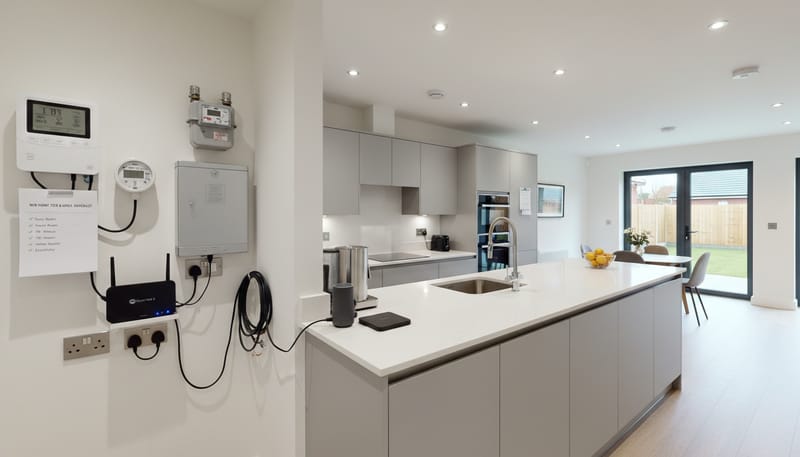
Moving into a new build home is exciting, but between picking up the keys and actually feeling settled, there's a long list of practical tasks to tick off. One area that catches many new homeowners off guard is getting the technology and utilities side of things sorted. Unlike older properties where the previous owner already had everything set up, a new build often means starting completely from scratch.
This guide walks you through everything you need to know — from getting broadband connected to choosing the right smart home setup, and making sure your utilities are running smoothly from day one.
Getting Broadband Up and Running
This is usually the first thing people want sorted, and understandably so. In a new build, you can't just transfer a previous connection — the property may not even be registered with providers yet. Here's what to do:
- Check availability early. Use the Openreach checker or individual provider websites at least 4–6 weeks before completion to see which services are available at your postcode.
- Full fibre is often available. Many new build developments come pre-wired for FTTP (Fibre to the Premises), giving you access to speeds of 900Mbps+. Take advantage of this — it's one of the genuine perks of buying new.
- Consider your router placement. The master socket is usually near the front door. If your office or living room is at the back of the house, you may need a mesh Wi-Fi system or ethernet backhaul to get reliable coverage throughout.
- Don't overlook network cabling. If you work from home or have a lot of connected devices, getting Cat6 ethernet cables run to key rooms during the early days (before furniture is in place) is far easier than retrofitting later.
If networking and connectivity isn't your strong suit, it's worth bringing in a professional. Companies like CloudSwitched offer IT support services that cover everything from broadband troubleshooting to full home network setup — particularly useful if you're working from home and need a reliable connection.
Setting Up Your Utilities
New builds typically come with meters already installed, but you'll still need to register with providers. Here's a quick rundown:
- Electricity and gas. Your developer should provide details of the initial supplier. You can switch to a better deal as soon as you move in. Smart meters are usually pre-installed in new builds, making it easy to track usage from day one.
- Water. This is assigned by region, so you won't have a choice of provider. Your developer should notify the water company, but confirm this yourself to avoid any gaps.
- Council tax. Register with your local authority as soon as you have a completion date. New builds sometimes qualify for a short exemption period if the property was previously unoccupied.
- TV licence. If you watch live TV or use BBC iPlayer, you'll need one from the day you move in.
One tip: set up direct debits for all utilities within the first week. It's easy to forget once you're busy unpacking and furnishing.
Smart Home Technology Worth Considering
New builds are ideal for smart home tech because the wiring is modern and the layout is predictable. You don't need to go overboard — even a few well-chosen devices can make daily life easier:
- Smart thermostat. Many new builds come with basic programmable thermostats, but upgrading to a Hive, Nest, or Tado gives you remote control and learning features that can genuinely reduce energy bills.
- Smart lighting. Start with the rooms you use most. Philips Hue or IKEA Trådfri are popular choices that don't require rewiring.
- Video doorbell and security cameras. Ring, Arlo, and Eufy all offer wireless options that are easy to install without drilling into your brand-new walls.
- Smart plugs and speakers. A low-cost way to start automating things like lamps, coffee machines, and music around the house.
The key to smart home tech is making sure everything talks to each other. Choose one ecosystem (Google Home, Amazon Alexa, or Apple HomeKit) and stick with it. If you want a more integrated setup — say, linking your heating, lighting, security, and entertainment into a single system — professional IT support can save you hours of troubleshooting and ensure everything is configured properly.
Setting Up a Home Office
Remote and hybrid working are now the norm for many UK workers, and a properly set up home office can make a real difference to your productivity. If you're buying a new build with a dedicated study or spare room, think about:
- Wired internet connection. Wi-Fi is fine for general use, but for video calls and large file transfers, a direct ethernet connection is noticeably more stable.
- Proper desk and ergonomics. This is a long-term investment in your health. Don't skimp on a decent chair and monitor setup.
- Dedicated power circuit. If your home office runs multiple monitors, a PC, and peripherals, consider whether the existing sockets can handle the load without extension leads everywhere.
- VPN and security. If you're accessing company systems from home, make sure your network is secure. Change default router passwords, enable WPA3 encryption, and consider a VPN for sensitive work.
If you're self-employed or running a small business from your new home, you'll also want to think about your online presence. Having a professional website makes a real difference when clients are searching for your services. Web development specialists like CloudSwitched can build you a site that works well on mobile, ranks in search engines, and actually converts visitors into enquiries — well worth the investment when you're trying to grow a business from your home office.
Entertainment and Media
Getting your TV, streaming, and audio sorted is the fun part. A few things to plan for:
- Aerial and satellite. Most new builds have aerial points pre-installed, but check whether your development allows satellite dishes — some have restrictions in the management company rules.
- Streaming. If you're ditching traditional TV, make sure your broadband package has enough bandwidth. A 4K stream uses around 25Mbps, so if multiple people are streaming simultaneously, you'll want at least a 100Mbps connection.
- Multi-room audio. Sonos, Apple HomePod, and Amazon Echo devices make it easy to have music throughout the house without running speaker cable.
The First-Week Checklist
To make sure nothing slips through the cracks, here's a condensed checklist for your first week in a new build:
- Order broadband (ideally 4–6 weeks before completion)
- Register with electricity, gas, and water suppliers
- Set up council tax
- Install smart thermostat and doorbell
- Test all sockets, light switches, and plumbing
- Set up your Wi-Fi network with a strong password
- Run ethernet cable to your home office if needed
- Configure smart home ecosystem (Alexa, Google, or HomeKit)
- Set up TV, streaming services, and audio
- Arrange direct debits for all utilities
Don't Be Afraid to Get Professional Help
There's no shame in admitting that setting up a home network, configuring smart devices, or getting your home office tech-ready isn't your thing. It's one of those jobs where getting it right the first time saves a lot of frustration down the line. Whether you need help with your home network and IT setup or you're looking for someone to build a professional website for your home-based business, there are specialists out there who can take the hassle out of it.
The whole point of buying a new build is starting fresh — make sure your technology setup matches the quality of the home itself.